
Atlassian Rovo
Rovo is Atlassian’s AI across Jira and Confluence. The same Rovo agent can work in chat, where a person confirms changes, or in automations, where often nobody is watching.
The lesson for builders
Moving a job from chat to an automation removes the person who confirmed each change. Before an agent runs unattended, re-check which account the agent acts as, what the agent may change, and where the results go.
What Atlassian Rovo can do, and where it stops#
Can do
- Create a Jira work item from chat, asking for missing fields and confirming before changing data.
- Run from an automation rule, for example reviewing a newly published decision page and posting a comment.
- Act as the person using the agent or as the agent’s own account with separately managed access (set in Studio).
- Let outside AI tools connect through MCP, with read, write, and search permissions set per app.
Where Atlassian Rovo stops
- Atlassian’s docs still disagree on whether automated agents can use their own tools: the general tools page says no, the automation guides say yes.
- Actions through connected apps like Slack can look as if the person did them.
How Atlassian Rovo handles one request#
The same four steps for every product on this site.
Step 1: A person asks, or the agent notices
A person asks a Rovo agent in chat or an editor, or an automation rule starts the agent, for example when a decision page is published or on a schedule.
Step 2: The agent prepares a change
In chat, the agent asks for missing required fields and prepares the change. In automations, the agent can return text for a later step or make changes directly when the agent is allowed to act.
Step 3: The person reviews the change in the product’s own screen
In chat, tools that change data ask for confirmation first. In automations, direct actions can run without confirming each one, and the builder decides when the agent runs and where results go.
Step 4: The product saves the change and keeps a way back
Confirming in chat applies the change, and in automations the audit log links what was created. Automation retries some failures from the failed step for up to seven days; a general rollback isn’t documented.
Worth copying#
What Atlassian Rovo gets right, with the source for each.
In Studio, a builder chooses whether an agent acts as the person using the agent or as the agent’s own account, with access managed like any other user’s.
Rovo caps Jira bulk actions at 20 work items at a time, which limits how far one wrong request can reach.
Live conversation review shows where users get stuck or drop off, so a team can find the jobs the agent doesn’t finish.
Gaps#
What Atlassian Rovo’s public docs don’t show yet.
Atlassian’s docs disagree on who can open an automation’s debug log: one page says only the flow’s creator, another adds admins.
Automation retries some failed rules from the point of failure, for up to seven days. Retries aren’t documented as making each change happen only once, and a general rollback isn’t documented.
The finding
The same agent confirms in chat but can write directly in automations#
In Rovo chat, Atlassian’s tools guide says the agent asks for confirmation before running consequential tools that may change data. A person asks for a Jira work item, the agent asks for any missing required fields, and the person confirms before the work item exists.
Put the agent in an Atlassian Automation rule and the person drops out. Atlassian’s automation page says agents in automations can be configured without confirming every action, and the Use agent action’s configuration guide says agents in automations can now perform write actions directly. The general tools page still says an automation-triggered agent can’t use its own tools and only returns text. The docs disagree, so the tenant’s actual settings decide.
Removing the confirmation is only the visible change. Three other things can move with the job:
- Whose permissions run the action. In Studio, an agent can act as the person using the agent or as the agent’s own account. With a person’s account in an automation, actions are logged against whoever set up the automation.
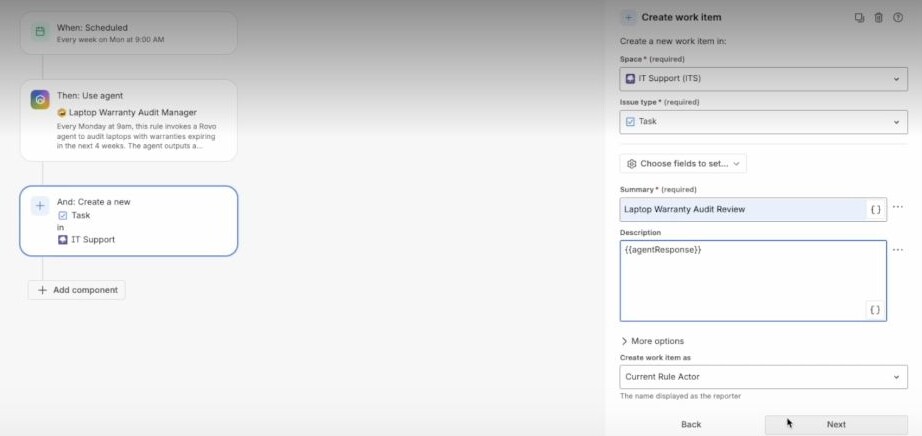
- Where the result lands. In Atlassian’s recorded warranty audit, a scheduled rule runs the agent, and a separate step creates a Jira task with the agent’s response as the description.
- Who notices a mistake. In chat, the requester is present before the change. In an automation, the builder chose the schedule and nobody watches each run.
Atlassian’s safety guide recommends narrowing an automated agent’s tools and, where it fits, duplicating an agent for one automated task. For builders: moving a job from chat to an automation is a new permission review. Check the acting account, the allowed writes and the destination before the first unattended run.
Sources#
- Add tools to Rovo agentssupport.atlassian.com
- Automate Rovo agentssupport.atlassian.com
- How to configure the Use agent actionsupport.atlassian.com
- Understand Rovo agent accountssupport.atlassian.com
- Best practices to automate agents safelysupport.atlassian.com
- Review live conversations with your Rovo agentsupport.atlassian.com
- Your Assets data at your fingertips with Rovo (Atlassian Community recordings)community.atlassian.com
Sources checked September 28, 2026.

Zapier is moving standalone AI agents into ordinary Zaps, where the agent becomes a single “AI by Zapier” step inside an automation.